Week 3
Dec 12/12/2022
- Tasks for today
- refactor template for aspnetcore template
- split frontend and backend
- check with Melissa once you receive the latest datadump from her
-
onClickbehavior enabled for the pushpins - CHAMA
- deploy aspnet core backend as an app service
- deploy react frontend
- have the frontend query the
weatherforecastapi - this works without the proxy (calling the endpoint directly)
Finding closest rainguage for each subcatchment
The following logic would be implemented as a Python Script.
pseduocode

for each subcatchment
  calculate the distance between it and all rainguages
  find the smallest
  update the `rainguage` attribute inside the rainguages GeoJSON

output --> subcatchment id, raingage as a csv?
how do we update inside the SWMM file?
Dec 12/13/2022
- ORSANCO
- Restore SQL Dump from Melissa
- Run and check the queries, graph looks okay
- Directly populate graph → No need to click on Apply (automatic apply button event)
- TDEngine
- Links for .NET 6 CORS stuff
- Link 1
- Links from Microsoft Documentation
- Reach out to Steve for some advice
- Collimator
- Follow up with Brian → high priority
- Grafana
- create Grafana account
- login with Pavan's account
- look at
gqccollimatorGrafana dashboard
Design for foo
Notes on proxy-server
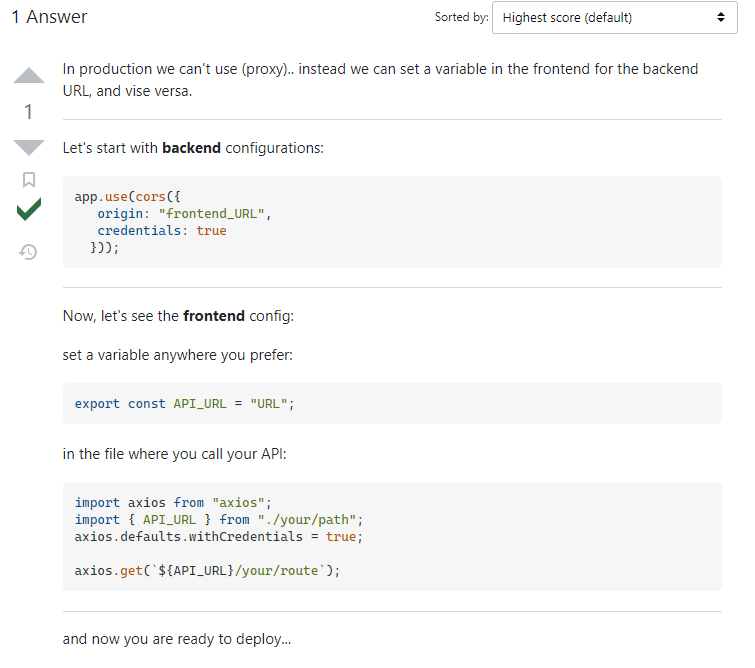
TLDR; Proxy is not meant to be used in production (deployment). It is only meant to be used of local development.
Links which give this answer
Suggested solution
What to use instead of a proxy? Answer → HERE
Dec 12/14/2022
- ORSANCO
- Fix bug on the deployed site
- disabled text input → now you can only update the textboxes from the maps page
- Reply from Brian
- Waiting for his reply
- created a new
gqc-collimatordiscord server
- Deployed ASP.NET Core
- create a new endpoint to get the sensor data from the
TDEnginerepo
- create a new endpoint to get the sensor data from the
- Reply the guy from Azure support
- CHAMA
- write up the action plan
- OH
- reorg of
projectdocs in thepeopleanddocs - need to write up a small plan and show it to Sudhir
- reorg of
Action plan for Chama
- get cordinates of the 5 subcatchments
- find the size of the ellipse
- size of the ellipse (vertical span) = dist(center , bottom left)
- width of the ellipse (horizontal span) = 0.5 * vertical span
- C = 1/(ax + ay + k), k=(1/100)
- Now, (x and y are in feet)
- x = 0.5*y
- k = known
- C = 10 lbs
- solve for a
Dec 12/15/2022
- Meeting with Azure support today @1.30 pm (Probably cancel the meeting)
- Enable caching
node_modulesinpeoplesite and thedocssite - Follow-up with Brian (Collimator) → he wanted to check with the engineering team
- Suggestion from Ragu
- Remove trailing slash → fixes the CORS issue
- CHAMA
- plumes are ready
- subcatchments impacted by ploom
- impacts with linear and exponential decay
- shape files for the plume (individual and merged) sent
- shape files for the affected subcatchment (individual and merged) sent
CHAMA Meeting notes
- Send Melissa the new pushpin layer
- Add
TSSasPolutant
- Add
- Factor in the radioactive → Jake mentioned it briefly
- SWMM on my system
- Any other CHAMA repositories as well
- Doc for raingage generation
Dec 12/16/2022
- ORSANCO
- new support ticket created for debugging
- Deployed Orsanco backend
- check available smaller sizes, switch to a smaller one
- aspbackend
- started the creation of the TDEngine controller
- will need more help either from Jake or Melissa
ORSANCO DB querying and other issues
- Running the debugger to see the response of the querynote
the debugger directly connects to the VM.
- Through the debugger you can see how the Queryset are being populated and filtered. Connection details are encapsulated.
- The connection is made possible, since Deven's and Jake's IP addresses are configured in the VM settings.
Additional deployment created for testing
- I created a new web app -- clone of the existing
orsanco-frontend - The repo is called orsanco_frontend_test_master
- The app is deployed over here → LINK
- The app contains the deployment from the master branch.
| frontend branch | extras | frontend-url | tool | url | DRF | Database | Works? |
|---|---|---|---|---|---|---|---|
| master | if you go directly | https://witty-plant-016ac0c10.2.azurestaticapps.net/dashboard/graphpage | browser | https://riverflows.azurewebsites.net/api/fake_data | master | NA | yes |
| master | if you select a push pin and then go to graphpage | https://witty-plant-016ac0c10.2.azurestaticapps.net/dashboard/graphpage | browser | https://riverflows.azurewebsites.net/api/daily/?startdate=1662076800&enddate=1663459200&river=Mississippi&reach=Lower%20Miss.&station=846&agg=flow | master | yes | CORS error |
Error
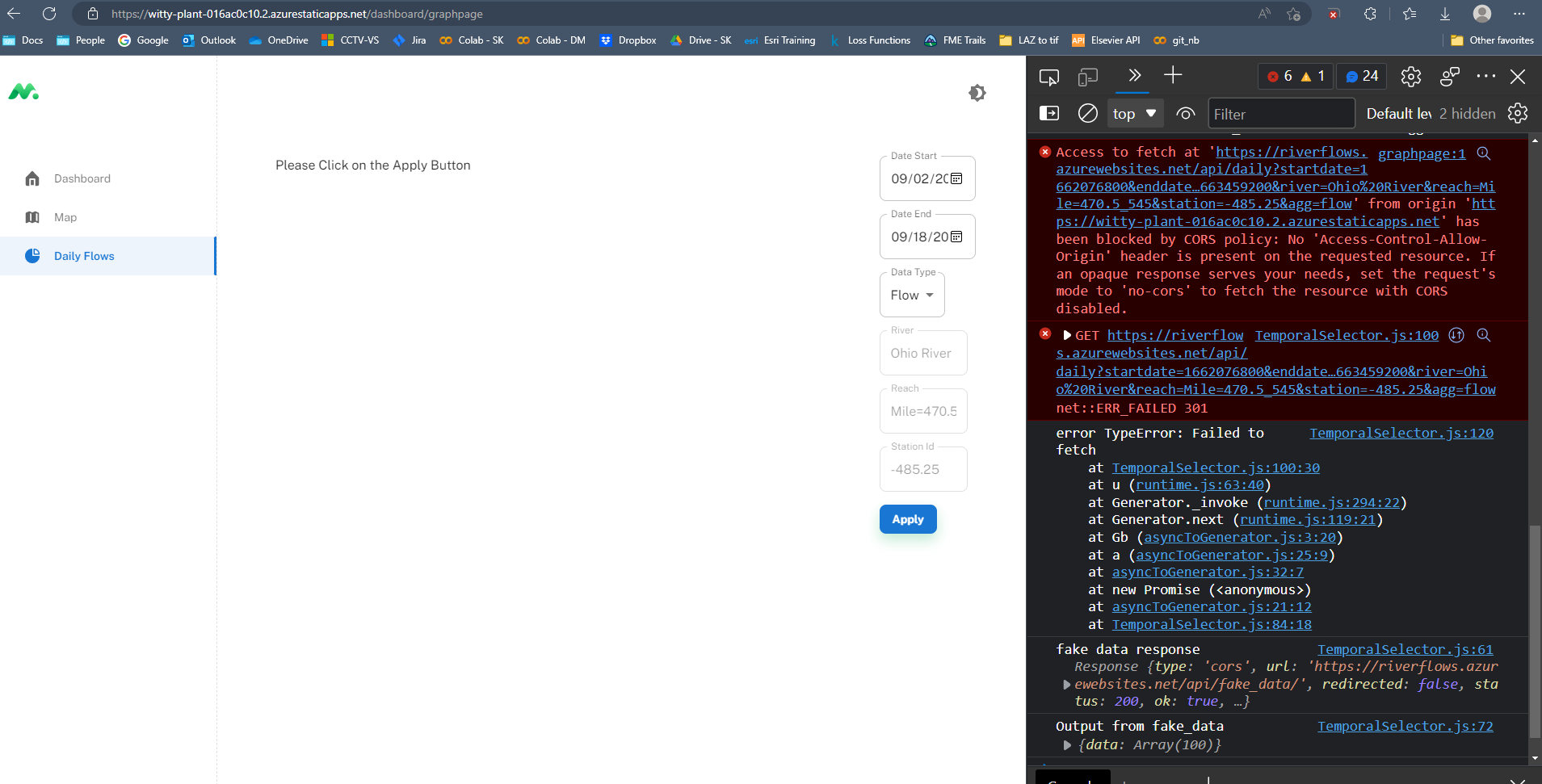
- The CORS error on the site indicates a weird thing.
- It is able to query the
fake_dataendpoint athttps://riverflows.azurewebsites.net/api/fake_data(output at the btm of the screenshot) - But, when it tries to query the endpoint at
https://riverflows.azurewebsites.net/api/daily...it gives a CORS policy error. - API Query String:
https://riverflows.azurewebsites.net/api/daily?startdate=1662076800&enddate=1663459200&river=Ohio%20River&reach=Mile=470.5_545&station=-485.25&agg=flow - Meaning, the VM is blocking the connection from frontend.
- To resolve this, I added the frontend's IP into allowed origins on the VM in the configuration settings but that did not work.
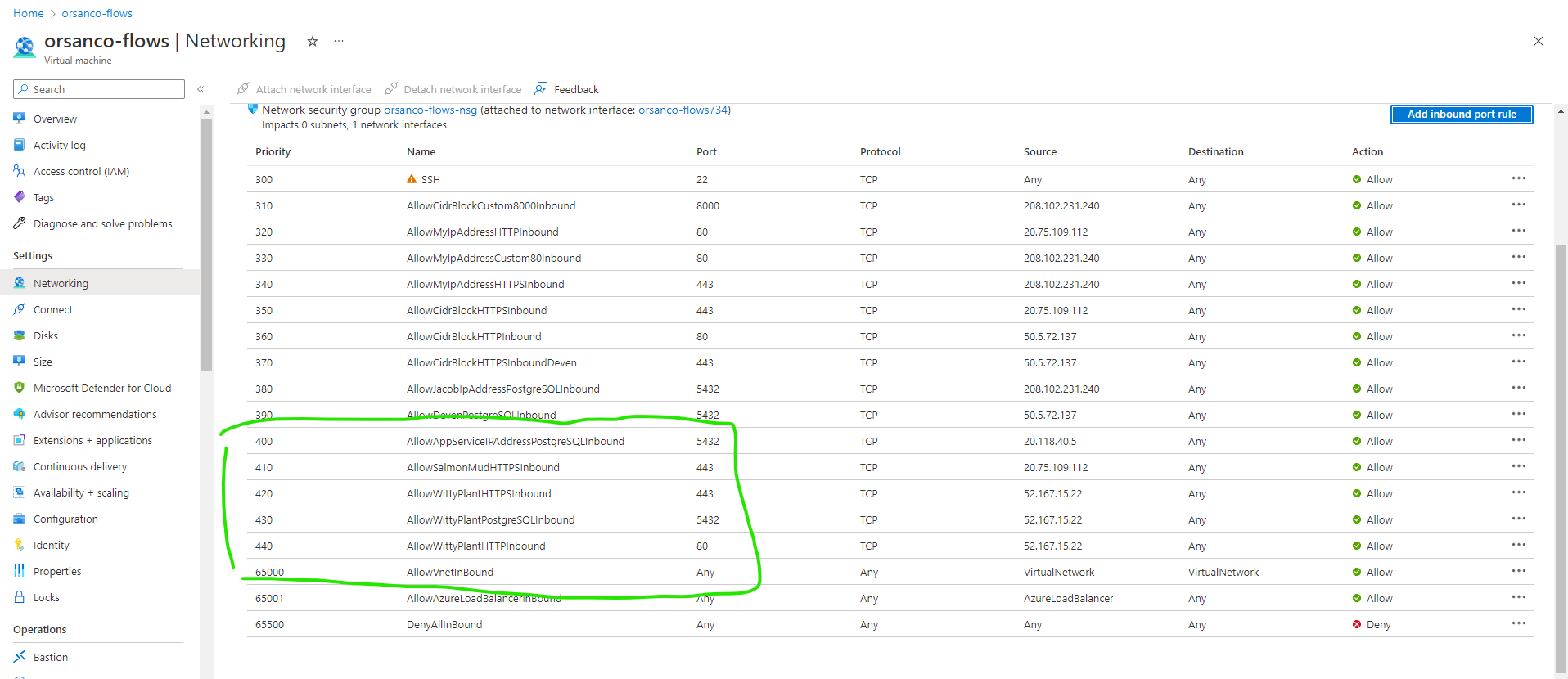
- I even added the VM's IP address in Django's allowed origin, even that does not help.
- The only thing left is to add the DRF in allowed origins of the VM.