List of Runs on compute canada
All DNV videos will be standardized to 700 x 470 size (from Pavan on Oct 06)
When using fastai, use the following script to assign the size of image
Resize((height,width)). Please note the report in wandb actually switches the position of height and width of the image.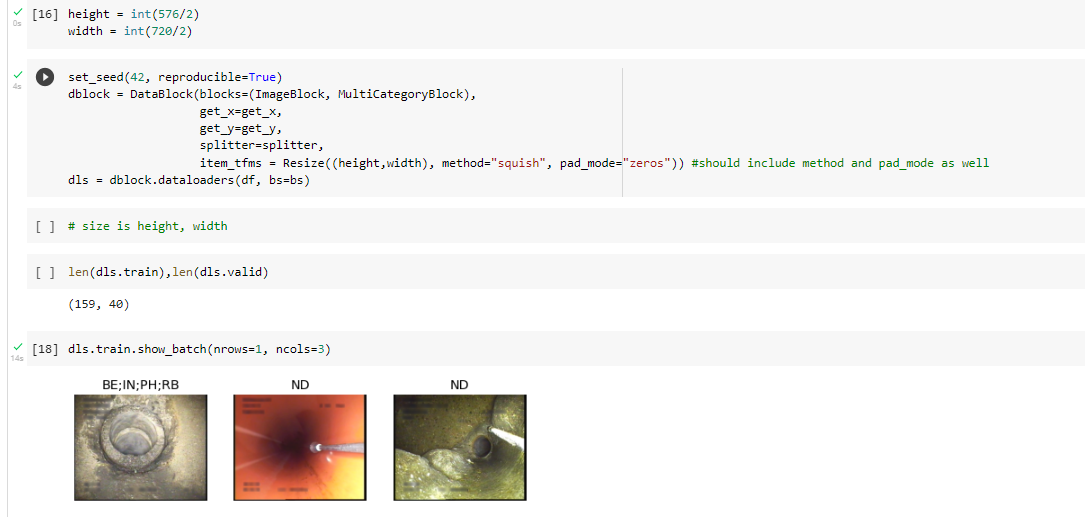

Sewer ML
- Trying to run fastai with Sewer-ML images from the 14 train folders for training and the 2 validation folders for the validation. The trained and validation images are resized to DNV image size. Submitting the job to compute canada with batch size = 32, epochs = 25 to v100l node. The purpose of this run is to get a model that is trained on all Sewer-ML images with the same image size as the DNV dataset.
- Trying to run fastai with Sewer-ML images from the 14 train folders. Those images will be split into 80% training and 20% validation datasets. All images are resized to DNV image size. Submitting the job to compute Canada with batch size = 32, epochs = 25 to v100l node. The purpose of this run is to get a model that is trained on images with the same image size as the DNV dataset. The images from the 2 validation folders are excluded in case we want to use those images as a test dataset.
- Trying to get the prediction label of Sewer-ML sample validation images (~600 images) with a saved model that was trained and validated with sample images (~3000 images). This is a test run to check if the code will run without any error.
- Trying to get the prediction label of all Sewer-ML images from the 2 validation folders with a saved model that was trained and validated with all Sewer-ML images from the 14 train folders. The saved model was trained with the image resized to 224 by 224 using the squish method. The purpose of this run is to get the f1 normal and f2 weight score of the saved model with the images from the 2 validation folders.
- F1 normal = 0.906
- F2 CWI = 0.581
- Run a fastai with accelerate once I get more information from pytorch documentation. (plan to submit the job)
- 12 epochs p100l image size = (356,239) batch size = 48 Dataset = sample (train and valid folders), --time= 1:30:00. (actual time = 16 min)
- (356, 239) - half of the DNV image size
- ID = 46563479
- 12 epochs v100l image size = (356,239) batch size = 96 Dataset = sample (train and valid folders) --time=1:30:00 (actual time= 16 min)
- ID = 46563490
- 12 epochs p100l image size = (356,239) batch size = 48 Dataset = Sewer_ML_train_val (train and valid folders)
- 83.67% of GPU0 Memory was used. It took 4 hours to run one epoch.
- 10 epochs + 4 freeze epochs, v100l, image size = (356, 239), batch size = 128, Dataset = Sample, --time=1:00:00
- 98.44% of GPU0 Memory was used. It took 0.5 min to run one epoch with sample image dataset.
- 10 epochs + 4 freeze epochs, v100l, image size = (712, 478), batch size = 32, Dataset = Sewer_ML_train_val, --time=160h
- 10 epochs + 4 freeze epochs, v100l, image size = (712, 478), batch size = 32, Dataset = alltrains, seed=42, --time=160h
- 10 epochs + 4 freeze epochs, v100l, image size = (356, 239), batch size = 128, Dataset = Sewer_ML_Train_Val, --time=60h
- implent sweep for hyperparmeters tuning run on sample_00.
- run fastai for multi defect classification with image aug
Resize((576, 720),method='squish', pad_mode='zeros'). I include method and pad_mod in the argument because if they are not includedcropandreflectionwill be chosen as default method and pad_mode. The input dataset are 14 training 2 validation SewerML images folders. - run fastai for multi defect classification with image aug
Resize((576, 720),method='squish', pad_mode='zeros'). The job is run using only 14 training SewerML folders. The dataset is split into 80/20 for training and validation. - run fastai for single water level classification using Danish 2015 standard with image aug
Resize((576, 720),method='squish', pad_mode='zeros'). The input dataset are 14 training 2 validation SewerML images folders. - run fastai for multi defect classification on sample_00_v2 dataset. The image aug was set to
Resize((288, 360),method='squish', pad_mode='zeros')(half size of the full image) - run fastai for single water level classification using Danish 2015 standard on sample_00_v2 dataset. The image aug was set to
Resize((288, 360),method='squish', pad_mode='zeros')(half size of the full image) - run fastai for multi defect classification on training and validation SewerML dataset (SewerML_Train_Val). The image aug was set to
Resize((288, 360),method='squish', pad_mode='zeros')(half size of the full image), batch size = 144, epoch = 10. - run fastai for single water level classification using Danish 2015 standard on training and validation SewerML dataset (SewerML_Train_Val). The image aug was set to
Resize((288, 360),method='squish', pad_mode='zeros')(half size of the full image) - run fastai for multi-defect classification on training and validation SewerML dataset without VA (water level) label as VA is only used at the beginning and end of the CCTV inspection run and when there is a change in water level with 10% step interval. I will replace images with the VA label with non-defect (ND) if the image doesn't have an additional observation label. From the last prediction run using SewerML trained model on DNV images, most images were labelled as VA. This prediction might improve if we get rid of the VA label.
- run fastai for water level estimation using Danish 2010 on only images that have VA label and their corresponding water level. (waiting for the sample job to run).
- run fastai for water level estimation using Danish 2015 on only images that have VA label and their corresponding water level. (waiting for the sample job to run).
- run fastai for water level estimation using Danish 2010 standard (10% interval) on training and validation SewerML dataset (for both full image size and half image size).
DNV
- run fastai using DNV images ('SANMN00893_1', 'SANMN00396_12', 'SANMN00478_14', 'SANMN01211_20') including MSA, MCU, and MWL labels. RunID = 15.
- run fastai using DNV images ('SANMN00893_1', 'SANMN00396_12', 'SANMN00478_14', 'SANMN01211_20') excluding images with MSA and MCU labels. Replace MWL with ND. RunID=16
- run fastai using DNV images ('SANMN00834_10','SANMN00868_27', 'SANMN00933_23','SANMN00937_2','SANMN00946_24') excluding images with MSA and MCU labels. Replace MWL with ND. RunID = 17
- run fastai using DNV images ('SANMN00893_1', 'SANMN00396_12', 'SANMN00478_14', 'SANMN01211_20','SANMN00946_24'), excluding images with MSA and MCU labels. Replace MWL with ND. RunID = 18. 'SANMN00946_24' has only two labels (ND and TF).
- run fastai using DNV images ('SANMN00893_1', 'SANMN00396_12', 'SANMN00478_14', 'SANMN01211_20','SANMN00946_24', 'SANMN00933_23') excluding images with MSA and MCU labels. Replace MWL with ND. RunID = 19. 'SANMN00933_23' has three labels (ND, TF, AMH).
- run fastai using DNV images ('SANMN00893_1', 'SANMN00396_12', 'SANMN00478_14', 'SANMN01211_20', 'SANMN00946_24', 'SANMN00933_23', 'SANMN00868_27') excluding images with MSA and MCU labels. Replace MWL with ND. RunID = 20. 'SANMN00868_27' has 3 labels (ND, FC, AMH).
- run fastai using DNV images ('SANMN00893_1', 'SANMN00396_12', 'SANMN00478_14', 'SANMN01211_20', 'SANMN00946_24', 'SANMN00933_23', 'SANMN00868_27', 'SANMN00834_10') excluding images with MSA and MCU labels. Replace MWL with ND. RunID = 21. 'SANMN00834_10' has four labels (ND, TB, DAE, and DAGS).
- run fastai using DNV images ('SANMN00893_1', 'SANMN00396_12', 'SANMN00478_14', 'SANMN01211_20', 'SANMN00946_24', 'SANMN00933_23', 'SANMN00834_10','SANMN00868_27', 'SANMN00937_2') excluding images with MSA and MCU labels. Replace MWL with ND. RunID = 22. 'SANMN00937_2' has 5 labels (ND, TB, BSU, BSV, AMH).
- Defect vs Non defect run with SewerML sample and full and DNV dataset
- Multi labels with DNV dataset (33 + 39 videoes)
- Water level estimation run with SewerML only on images with VA labels for Class10 and Class15. Half and full size images
- Submit the jobid 03 multi-label defect class for half image
- Submit Multi-labels defect run for epoch = 5 with freeze epoch = 4
- SewerML_Train_Val_no_va half image
- SewerML_Train_Val half image
- SewerML_Train_v1 half image
- Submit water level estimation class 10, class 15 for 50 epoch because the validation loss are >= 0.5 when running with 10 epoch
- full image will see how much does it take to run half image first
- half image
- I will need to run the fastai with different loss function.
Other
- add runID to wandb name
- add a way to calculate f2score weighted and add it to summary table
- email compute canada how to see which node p100l or v100l is to be in queue the shortest to shorten my waiting time.Ans: use the following command to see the top 100 pending job:
squeue --state=pending | head -n 100. - Need to send a follow up email to compute canada how we tell the different between which jobs belong to p100l, v100l and etc.
- run without resize on colab on sample. Try with low batch size to make sure CUDA does not run out of memory.
- When run without item_tfms, we got an error saying that
Please include a transform in 'after_item' that enures all data of type TensorImage is the same size - if there is issue, run with resize of (576, 720) on sample on colab
- learning_rate is not change for every runs because of seed. Check if doubling learning rate cut the computing time.
- learn.plot_top_losses to find what area of your model perform the worse.
- standard NASSCO video image size.