Pipe Breaks in Colab
This document contains the steps to run the
pipe-breaksrepo in Google Colab.
Prerequisites
- Personal Access Token for GitHub(for making commits and pushes through Google Colab)
- To create the Personal Access Token, follow the instructions over HERE
- To access the Terminal on Google Colab, you will need the Pro Tier subscription.
caution
Certain algorithms benefit from GPU, while starting a notebook, choose GPU as your Hardware Accelerator.
Since Google Colab has switched to a compute credits based mechanism now, make sure you disconnect the runtime once the algorithm has finished its execution.
Clone the pipe_breaks
- If running through colab, follow below steps
- Copy the
httpsURL from GitHub repo ofpipe_breaks - Open a notebook, mount the Google Drive in the notebook using the following command.
from google.colab import drive
drive.mount('/content/drive') - Once the drive is mounted, open the Terminal.
cdinto the directory where you wish to clone the repository- Once in the desired repository, clone the repo.
git clone https://github.com/gqc/pipe_breaks.git
- Copy the
- If running through local, just clone the repository in to the local machine.
Installing the pipe_breaks
- Once the repository is cloned, open the terminal in the notebook.
cdinto thepipe_breaksrepo cloned on the Google Drive.- Install the
pipe_breaks
Configuring the inputs and settings
- Based on the utility and the algorithm that you wish to run, setup the appropriate files in the
input_filesfolder and variables insettings.py - Return to the terminal in the notebook, you are now ready to make runs.
Using the script_runner
- Once the necessary input files are put in their correct place, start the terminal.
cdin thepipe_breaksrepo cloned on the Google Drive.- To see the help while running the CLI,
python script_runner.py -h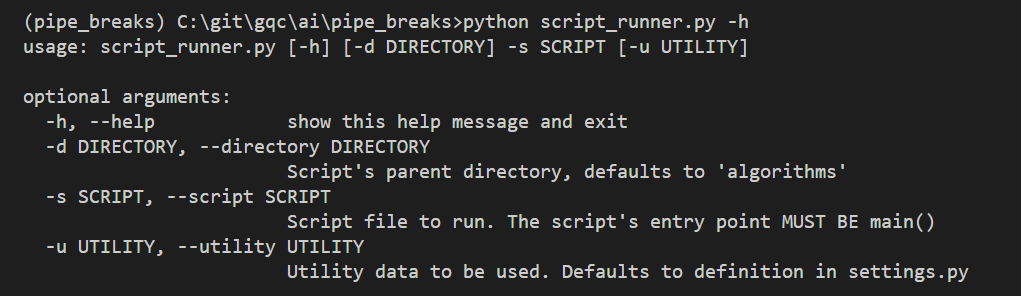
- Choose the desired algorithm and utility and make the run.