Common Issues in React
Syntax Error in manifest.json
The resolution for this error was to set the 'crossorigin' property to 'use-credentials' as described in this article.
<link rel="manifest" crossorigin="use-credentials" href="%PUBLIC_URL%/manifest.json" />
404's and Redirects
I know we fixed some common issue with this, but I don't remember what exactly it was...
CORS on API Calls
CORS in Production Environments
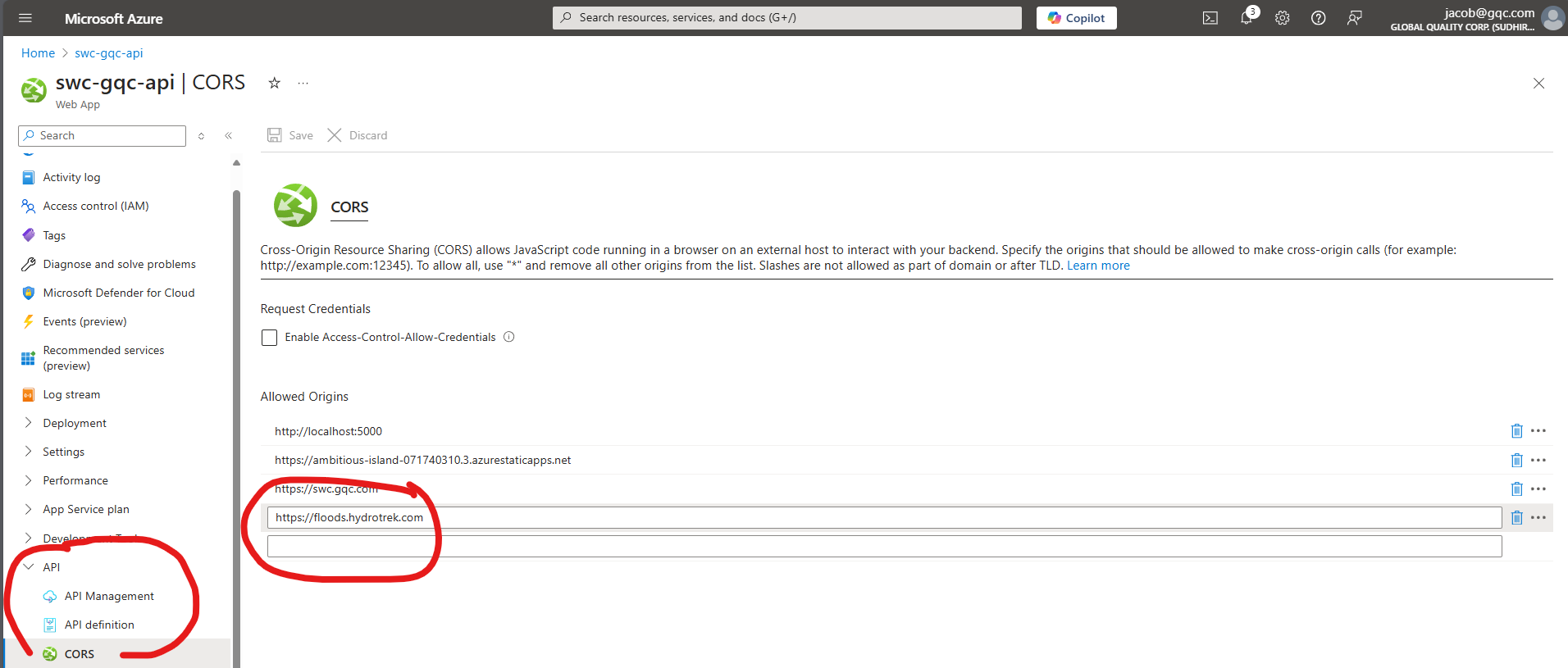
When making calls to a published API (Azure Webapp) from a published site (Azure SWA), you'll need to configure the API to allow traffic from specific sources, i.e. the consumer's (SWA's) hostname.
- From the Azure Portal for a given API (Webapp), open the API tab and click on "CORS".
- Add the consumer's hostname (for example
https://floods.hydrotrek.com) and click Save.
React Configuration
- Open the
setupProxy.jsfile. - Configure the
target: ''to point at the API, i.e.http://localhost:8000for a DRF API orhttp://localhost:5159for ASP.NET. - Configure the
const context = []array to include all endpoints that should be proxied.
⚠️ React and DRF DO NOT work with localhost so make sure to use 127.0.0.1 instead in these cases.
Django Rest Framework Configuration
In your local_settings.py file, define the following constants:
  ALLOWED_HOSTS = ['127.0.0.1']
  CORS_ALLOWED_ORIGINS = ALLOWED_HOSTS
ASP.NET Configuration
TODO
More TBD
Sudhir and Deven should review this and come up with any more common issues we've solved.